

How To Remove Login Password In Windows Xp
How to Remove Windows XP Logon Password After Forgotten
Go stuck at Windows XP Welcome screen and can't bypass the logon password? How to log on to Windows XP if yous forgot the ambassador password? PCUnlocker is an astonishing bootdisk that can help you lot remove Windows XP logon password, and unlock a disabled, locked or expired user account.
To go the software to piece of work, you will need to make a PCUnlocker Live CD from another computer. Boot your locked Windows XP arrangement from the Alive CD and you tin can easily remove forgotten logon password in the Security Accounts Manager (SAM). These instructions are written bold a bootable CD is beingness used, only are essentially the same for a bootable USB drive.
1Create A PCUnlocker Alive CD
- Download the PCUnlocker software using an alternative computer. Once downloaded, extract the ISO file (pcunlocker.iso) from the Nix file.
-
Next download and install ISO2Disc, a freeware for making bootable CD or USB bulldoze. Run the ISO2Disc program, click on Browse button to select the PCUnlocker ISO epitome.
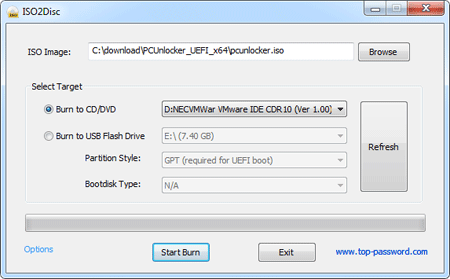
- Choose your CD/DVD recorder and click on Start Burn to make a PCUnlocker Live CD.
twoAlter Boot Order in BIOS
- Later on you've created a PCUnlocker Live CD, put it in the CD drive of the locked Windows XP computer you lot want to remove the password for.
- Ability on the computer and rapidly printing the primal indicated in the POST screen (i.e. DELETE central, F2 key, F12 key) to enter BIOS Setup. The verbal fundamental depends on your computer – if yous don't see the appropriate primal displayed on your screen, consult your computer's manual.
-
In one case you're in the BIOS Setup, go to the Kick menu. Alter the kick sequence and set your computer to kicking from CD/DVD starting time.
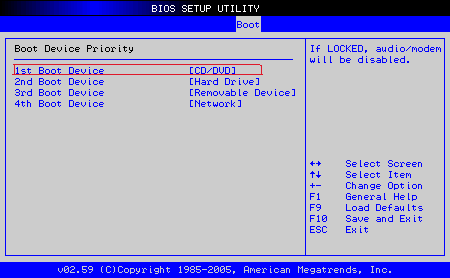
- Press F10 to save your changes and leave the BIOS.
3Remove Windows XP Logon Countersign
-
The estimator will then restart from PCUnlocker Alive CD. Afterward a while, y'all'll see the PCUnlocker program and it shows you a list of local accounts stored in the Security Accounts Managing director (SAM).
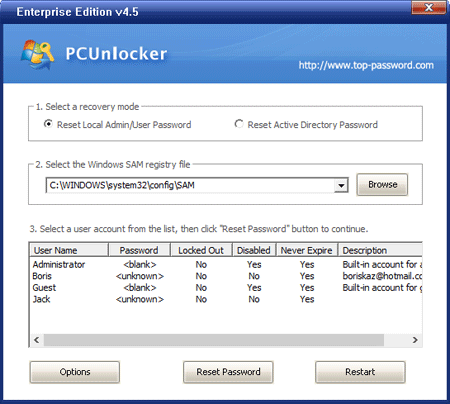
- Choose a user and click Reset Countersign button, the program will unlock / remove your forgotten Windows XP logon countersign immediately.
- Now take out the Live CD. The next time you kick, Windows XP will load upward on its own without asking for a countersign. If you lot're on a multi-user computer, the logon screen volition still appear after starting Windows XP merely when you click on the user that had the password removed, you will not be prompted for a password and will instead enter Windows automatically.
If y'all don't see your desired user on the Windows XP Welcome screen, press Ctrl+Alt+Del twice to display the archetype logon dialog and you will exist able to blazon both user proper name and password.
Related Articles

Source: https://www.top-password.com/knowledge/remove-windows-xp-logon-password.html
Posted by: buitronthasma.blogspot.com
0 Response to "How To Remove Login Password In Windows Xp"
Post a Comment